You can add a portfolio company to multiple funds directly through the Account Setup Feature. You should have received an email inviting you to complete your 2025 Reporting Cycle Setup. If you need help guidance on this feature, please refer to our article: How do I get my account ready for fund reporting?
Step-by-step Instructions
-
Open the Account Setup Feature
Navigate to the first step, Org Structure.
-
Add or edit a portfolio company
Here you can create a new company or update an existing one.
-
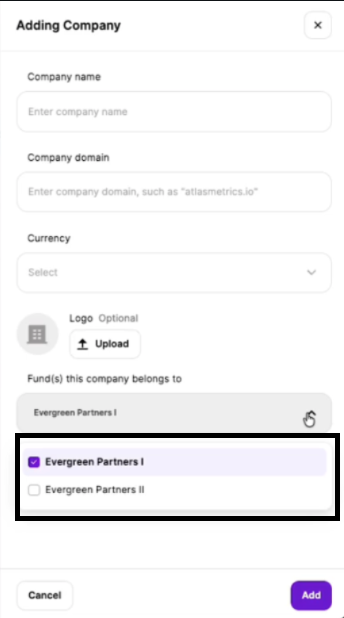
Assign the company to multiple funds
In the section “Funds this company belongs to”, select every fund you want this company to report to.
- You can select more than one fund.
- The company will appear under all selected funds.
-
Save your changes
Once saved, the company will automatically be linked to all chosen funds.
Please refer to the screenshot below for visual guidance.